
Key takeaways
- Compare the best smart plugs for schedules, timers, voice control and energy monitoring, from mini plugs to Matter and weather-ready outdoor models.
A smart plug is the simplest way to automate a device that has no smart features of its own. It sits between the wall outlet and the plug of a lamp, fan, coffee maker or holiday light string, and it switches that power on and off from an app, a voice assistant or a schedule you set once and forget. For renters and first-time smart home buyers, it is usually the easiest place to start because nothing gets wired in and the plug moves with you.
The five plugs below cover the main ways people buy these devices. There is a simple Alexa-only plug for a single outlet, a mini four-pack for covering several rooms, a model that reports energy use in its app, a Matter plug that works across Apple, Google, Amazon and Samsung platforms, and a weather-resistant outdoor plug with two independently controlled sockets. Every rating and feature mentioned is stated by the maker, so check the load of the appliance you plan to connect before you buy.
As an Amazon Associate, we earn from qualifying purchases.
How to Choose
Start with the electrical rating. Most indoor smart plugs in this guide are rated by their makers at 15 amps maximum, which suits lamps, fans and most small appliances. The Emporia plug below lists a lower continuous rating, so it suits lighter loads better. Match the plug rating to the appliance nameplate, and never use an indoor plug where it can get wet.
Next, check the radio. Almost every plug here connects to 2.4 GHz Wi-Fi only, so a dual-band router needs its 2.4 GHz band switched on. Matter plugs such as the Tapo P125M add cross-platform support, which matters if your household mixes iPhones and Android phones or you may switch voice assistants later. Alexa-only plugs are simpler but lock you into one ecosystem.
Then decide which extras you will actually use. Energy monitoring helps you see what a space heater, entertainment center or old refrigerator draws over time, as reported in the maker’s app. Mini housings leave the second socket of a duplex outlet free, which matters behind furniture. For patios and yards, pick a plug the maker rates for outdoor use, with a weather resistance rating and a mounting point so it does not dangle from the outlet.
Amazon Smart Plug
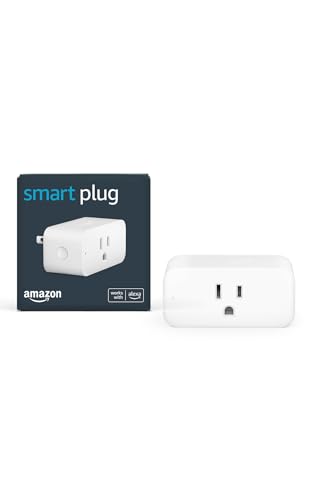
The Amazon Smart Plug is the most direct route into outlet automation for an Alexa household. Setup runs entirely through the Alexa app, with no separate account or hub, and Amazon describes it as a Certified for Humans device, which is its label for products designed to be simple to install. Once it is on your network, you control it by voice with any Alexa device or from the app, and you can build Alexa Routines that switch it with sunrise, a voice phrase or another smart device.
The housing is compact enough that the second socket of a standard outlet stays free for another plug. Amazon rates the output at 15 amps maximum and notes that the plug reconnects to Alexa automatically after a power or Wi-Fi outage, which keeps schedules and routines running without a manual reset. The trade-off is exclusivity: it works with Alexa only, not Google Home or Apple Home, and it offers no energy monitoring. As a single-outlet starter for an Echo household, though, it is hard to make the setup any simpler.
Specs
- Rating: 15 amps maximum output, 120 volts, as stated by Amazon
- Protocol: Wi-Fi, 2.4 GHz only
- Control: Alexa app and Alexa voice control; no hub required
- Count: 1 plug per pack
Kasa Smart Plug Mini EP10 (4-Pack)

The Kasa EP10 is the pick when you want several rooms automated at once. This four-pack of mini plugs shares one Kasa app, where each plug gets its own schedules, countdown timers and an Away Mode that switches a lamp on and off at varied times. Kasa rates each plug at a 15-amp maximum load and lists UL certification, and the mini housing is shaped to leave the neighboring socket usable, which helps in kitchens and behind media consoles where outlets are crowded.
Voice control covers Alexa and Google Assistant, plus IFTTT for people who chain services together. Group control in the Kasa app lets one tap switch several plugs together, so a living room lamp, a fan and a string of decorative lights can follow a single evening schedule. There is no energy monitoring on this model, and like most plugs here it connects to 2.4 GHz Wi-Fi only. For straightforward scheduling across multiple outlets, the EP10 four-pack covers the basics well.
Specs
- Rating: 15 amps maximum load per plug, as stated by TP-Link
- Protocol: Wi-Fi, 2.4 GHz only
- Control: Kasa app; Alexa, Google Assistant and IFTTT
- Count: 4 plugs
Emporia Energy Monitoring Smart Plug (4-Pack)

The Emporia plug is built for people who want numbers, not just on and off. Each plug reports the energy use of the connected appliance in the Emporia app, where you can follow consumption over time and set schedules and timers around it. That makes this four-pack a practical fit for watching loads such as a window air conditioner, a game console setup or a chest freezer, where knowing the draw helps you decide what should run and when.
Emporia lists a 15-amp maximum with a 10-amp continuous rating of 1,200 watts in its technical details, so this is a plug for moderate loads rather than the largest heaters. Voice control works through Alexa and Google Assistant, and the plugs also tie into Emporia’s wider energy products if you later add its whole-home monitor. The housing is larger than the mini plugs above, so measure crowded power strips before ordering. If tracking usage matters more than saving space, this is the informative option.
Specs
- Rating: 15 amps maximum, 10 amps continuous (1,200 watts), per Emporia
- Protocol: Wi-Fi, 2.4 GHz only
- Control: Emporia app with energy monitoring; Alexa and Google Assistant
- Count: 4 plugs
TP-Link Tapo P125M (3-Pack)

The Tapo P125M is the future-proofing pick. It speaks Matter over Wi-Fi, the shared standard that lets one device work with Apple Home, Amazon Alexa, Google Home and Samsung SmartThings instead of a single brand’s app. TP-Link rates it at 15 amps and 1,800 watts maximum, lists UL certification, and gives it Bluetooth onboarding, which the maker says speeds up first-time setup. For a mixed household, or anyone unsure which platform they will favor in two years, that flexibility is the point.
The housing is the smallest in the Tapo line, at about 2.4 inches tall, so stacked outlets stay accessible. The Tapo app adds schedules, timers and an away mode, and voice control follows whichever Matter platform you pair it with. This three-pack has no energy monitoring, and Matter features can vary slightly by platform, so check your chosen app for the exact controls offered. If cross-platform support tops your list, the P125M is the one to buy.
Specs
- Rating: 15 amps, 1,800 watts maximum, as stated by TP-Link
- Protocol: Matter over Wi-Fi, 2.4 GHz; Bluetooth onboarding
- Control: Tapo app; Apple Home, Alexa, Google Home and SmartThings
- Count: 3 plugs
Kasa Outdoor Smart Plug EP40

The EP40 takes the same scheduling tools outside. Its sealed black housing carries an IP64 weather resistance rating from the maker and two sockets that you control independently, so the patio lights and a fountain pump can follow different schedules from one outlet. TP-Link rates the plug at 15 amps, lists ETL certification, and states a Wi-Fi range of up to 300 feet in open areas, helped by a built-in signal amplifier. A short six-inch cord, clamp and screw are included for mounting it off the ground.
The Kasa app adds sunrise and sunset offsets, which suit landscape lighting that should track the seasons, plus countdown timers and Away Mode. Voice control runs through Alexa and Google Assistant, with IFTTT support as well. It is a single-purpose tool: the housing is bulky for indoor use and there is no energy monitoring. For holiday lights, pool equipment within its rating, or garden lighting, it is the appropriate weather-ready choice.
Specs
- Rating: 15 amps, IP64 weather resistance, as stated by TP-Link
- Protocol: Wi-Fi, 2.4 GHz
- Control: Kasa app; Alexa, Google Assistant and IFTTT; two sockets controlled separately
- Count: 1 plug with 2 sockets
Comparison
| Product | Type | Rating (maker stated) | Protocol | Control | Pack |
|---|---|---|---|---|---|
| Amazon Smart Plug | Standard Wi-Fi | 15 A max | Wi-Fi 2.4 GHz | Alexa only | 1 |
| Kasa EP10 | Mini | 15 A max | Wi-Fi 2.4 GHz | Alexa, Google, IFTTT | 4 |
| Emporia Smart Plug | Energy monitoring | 15 A max, 10 A continuous | Wi-Fi 2.4 GHz | Alexa, Google | 4 |
| Tapo P125M | Matter mini | 15 A / 1,800 W max | Matter over Wi-Fi | Apple, Alexa, Google, SmartThings | 3 |
| Kasa EP40 | Outdoor | 15 A, IP64 | Wi-Fi 2.4 GHz | Alexa, Google, IFTTT | 1 (2 sockets) |
The pattern is simple. The Amazon and Kasa indoor plugs compete on app and voice platform, the Emporia adds measurement, the Tapo adds Matter, and the EP40 is the only one here the maker rates for outdoor use. Ratings are similar on paper, so the right choice is the one whose platform and extras match the job.
FAQ
Do I need a hub to use a smart plug?
No. Every plug in this guide connects directly to your home Wi-Fi and is managed from the maker’s app or a voice assistant app. The Tapo P125M can also join a Matter setup, where a platform hub such as a smart speaker may act as a Matter controller, but the plug itself needs no separate bridge.
Why do smart plugs only use 2.4 GHz Wi-Fi?
Makers design these plugs for the 2.4 GHz band because it carries farther through walls than 5 GHz and is enough for the small amounts of data a plug sends. If your router merges both bands under one name, setup usually still works; if a plug refuses to connect, temporarily splitting the bands in the router settings is the common fix described in maker support pages.
How much can I plug into a smart plug?
Stay within the rating the maker prints for that model: 15 amps maximum for most plugs here, and a 10-amp continuous rating for the Emporia. Check the appliance nameplate, be careful with devices that draw heavily for long periods such as space heaters, and follow the plug maker’s guidance about which appliance types are supported.
Can I use an indoor smart plug outside?
No. Indoor plugs have no weather resistance rating and their makers specify indoor use only. For a patio, yard or holiday display, choose a plug rated for outdoor use, such as the IP64-rated Kasa EP40, and mount it as the maker directs so water cannot pool around the sockets.
Final Verdict
For a single outlet in an Alexa home, the Amazon Smart Plug is the simplest start. The Kasa EP10 four-pack is the better value pattern for covering several rooms with schedules, while the Emporia four-pack suits anyone who wants energy figures in the app before automating heavier routines. The Tapo P125M is the pick for mixed-platform homes that want Matter support, and the Kasa EP40 is the one to take outdoors. Match the rating to your appliance, confirm your 2.4 GHz network is ready, and any of the five will do its job.
Product and ASIN Reference
| Product | ASIN |
|---|---|
| Amazon Smart Plug | B089DR29T6 |
| Kasa Smart Plug Mini EP10 (4-Pack) | B091FXLMS8 |
| Emporia Energy Monitoring Smart Plug (4-Pack) | B0CLVRZ2QL |
| TP-Link Tapo P125M (3-Pack) | B0BXMNJDW3 |
| Kasa Outdoor Smart Plug EP40 | B091FXH2FR |
FAQ
Do I need a hub to use a smart plug?
Why do smart plugs only use 2.4 GHz Wi-Fi?
How much can I plug into a smart plug?
Can I use an indoor smart plug outside?
More from Amazon
Programs that pair well with the guide above. Offers and eligibility are set by Amazon and may change.
Free shipping on eligible items, Prime Video and more. Eligible new members can start with a free trial.
Start a Prime free trialAudiobooks and podcasts to listen to on the go. Eligible new members can start with a free trial.
Try Audible freeAd-free music streaming. Eligible new subscribers can start with a free trial.
Try Music Unlimited freeA free business account with business pricing and bulk-buying tools for work, shop or home office.
Create a business accountAs an Amazon Associate we earn from qualifying purchases.



Write Your Review
No reviews yet. Be the first to share your experience!