
Key takeaways
- Choose an expansion battery that actually fits your home backup system: host model, expansion port, cable and capacity checks for major brands.
A home backup system fails on compatibility before it fails on capacity. The station is wired into your routine, maybe into a transfer arrangement, the loads are chosen, and then the expansion battery arrives and turns out to belong to a different generation of the brand. Expansion packs are the least interchangeable products in home power: each one is built for named host stations, with a matching port, cable and control link. So this purchase is a verification exercise first and a capacity exercise second.
This guide is for homeowners assembling a backup system around a station they own, and for buyers choosing a station and its expansion pack together. It concentrates on the checks that decide whether a pack belongs in your system: the host list in the title, the cable in the box, and the expansion ceiling of the host. The five packs below come from their Amazon listings, with host and capacity figures quoted from those pages.
Quick Picks
As an Amazon Associate we earn from qualifying purchases at no extra cost to you.
| Product | Best for | Key spec from title |
|---|---|---|
| EF ECOFLOW DELTA 2 Max Extra Battery | A home system that may change EcoFlow hosts over time | 2048Wh LiFePO4, fits DELTA 2, DELTA Max 2000 and DELTA 2 Max |
| BLUETTI B300K Expansion Battery | A BLUETTI home system needing a large, cable-included step | 2764.8Wh LiFePO4, fits AC200L, AC300, AC500 and AC200MAX, P090A cable included |
| OUPES B2 Smart Extra Battery | A home system designed to expand in planned stages | 2048Wh LiFePO4, fits Mega 1, Mega 2 and Mega 3, extra battery cable included |
| EF ECOFLOW DELTA 2 Smart Extra Battery | A settled DELTA 2 home setup that just needs more storage | 1024Wh LiFePO4, for DELTA 2, model EFD330-EB |
| Anker SOLIX BP3800 Expansion Battery | A fixed F3800 home system built for long events | 3840Wh LiFePO4, for SOLIX F3800 Series, battery-to-host cable included |
How to Choose
Verify the host by full model name and generation
Home systems live for years, which means generations overlap in the same house. A station bought three years ago and its current namesake may take different packs. The listing title is the contract: the B300K names AC200L, AC300, AC500 and AC200MAX, and any other BLUETTI, however similar, is outside it. Find the model name on your station’s label, then find that exact name in the pack’s title. If you are choosing a station and pack together, buy them as a named pair from the same listing family, not as two separate guesses.
Treat the expansion port and cable as part of the system
A compatible pack still has to physically join the host. Listings that include the joining cable, the B300K with its P090A cable, the BP3800 with its battery-to-host cable, the B2 with its extra battery cable, remove one failure point. Where a listing does not name a cable among its components, assume nothing and confirm on the page. Also check that your host’s expansion port is the one the pack expects, since a home system may already use nearby ports for solar input or other accessories you rely on.
Respect the host’s expansion ceiling when you plan the system
Compatibility includes quantity. Each host accepts a stated number of packs, and a home system should be planned against that ceiling from the start. The OUPES listing describes up to six B2 packs on Mega 2 and Mega 3 but fewer on Mega 1, which changes which host a growing household should pick. If your five-year plan needs more storage than the ceiling allows, that is a reason to choose a different host now, while the system is still on paper, rather than after the second pack arrives.
Keep the whole system inside one ecosystem, permanently
A home backup system is not the place for improvisation. Packs communicate with their host, sharing charge state and control, and that link is designed per brand and per model line. Mixing a pack from another brand, or bridging with an adapter bought separately, is outside every listing in this guide. Decide your ecosystem when you buy the host, because the pack choices, the cables and the stacking limits all follow from that one decision. The good news is that each major ecosystem here offers a sensible growth path once you are inside it.
Safety Notes
Compatibility is a safety matter as well as a fit matter. An expansion pack is built for the voltage and controls of its named hosts, so connect it only to a station its listing names, using the maker’s cable, and never bridge brands or generations with adapters or cables of unknown origin. Follow the charging and storage directions on each listing, keep the system in a dry, ventilated place away from heat sources, and keep connectors dry. Any connection between a station and your home’s wiring belongs to the host maker’s own equipment and a qualified electrician, not to improvisation. Test the finished system under load before an outage does.
The 5 Best Options
EF ECOFLOW DELTA 2 Max Extra Battery

This pack earns its place in a home system on the strength of its host list. The title names three EcoFlow stations, DELTA 2, DELTA Max 2000 and DELTA 2 Max, so a household can add storage today and carry the same pack across an in-brand station upgrade later. It adds 2048Wh of LiFePO4 capacity, enough to move a mid-size home setup from evening cover to overnight cover for essential loads. At 42 pounds it can still be repositioned by one person when the system layout changes, which home systems tend to do in their first year.
Specs
- Capacity: 2048Wh, as listed in the product information
- Battery type: LiFePO4 (LFP)
- Compatible hosts from title: EcoFlow DELTA 2, DELTA Max 2000 and DELTA 2 Max
- Model: EFD350
- Item weight: 42 pounds, as listed
Best for: EcoFlow households that want expansion storage with room to change hosts inside the brand.
Watch out for: Confirm your exact host is one of the three named, and check the listing for cable inclusion for your pairing, since the components line names the battery unit itself.
ASIN: B0CPP81GNL
BLUETTI B300K Expansion Battery

For a BLUETTI-based home system, the B300K is the straightforward large step: 2764.8Wh, four named hosts, and the P090A expansion cable in the box. That combination covers the two compatibility questions homeowners actually get wrong, whether the pack fits the station and whether the cable is a separate errand. Its size, 65 pounds and over 20 inches long, suits a permanent garage or utility-room installation beside the host. If your station is an AC200L, AC300, AC500 or AC200MAX, this is the pack the listing built for you.
Specs
- Capacity: 2764.8Wh, as listed in the product title and information
- Battery type: LiFePO4
- Compatible hosts from title: BLUETTI AC200L, AC300, AC500 and AC200MAX
- Included components: B300K battery and P090A battery expansion cable
- Item weight: 65 pounds, as listed
- Dimensions: 20.47 x 12.6 x 10.31 inches, as listed
Best for: BLUETTI home systems on the named host list that need one large, fully-cabled capacity step.
Watch out for: The listing spans several BLUETTI pack styles, so confirm the B300K style is selected and matches your host before you complete the order.
ASIN: B09SXJXH5H
OUPES B2 Smart Extra Battery
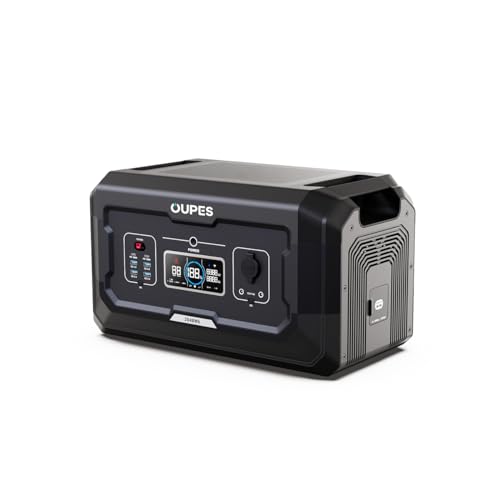
A home system planned in stages is where the B2 belongs. It serves the OUPES Mega 1, Mega 2 and Mega 3, adds 2048Wh per pack, and its listing describes systems growing to six packs on the larger hosts, so the compatibility plan can be written years ahead. The extra battery cable and manual are listed as included, and WiFi and Bluetooth app control from the title helps in a home setting where the system may sit in a garage or basement. Choose the host with the ceiling your plan needs, then add packs as the plan matures.
Specs
- Capacity: 2048Wh, as listed in the product title and information
- Battery type: LiFePO4
- Compatible hosts from title: OUPES Mega 1, Mega 2 and Mega 3
- Included components: B2 Smart Extra Battery, extra battery cable and user manual
- Model: S2-BAT
- Control: WiFi and Bluetooth app control, as listed in the title
Best for: OUPES households designing a backup system that grows in verified 2048Wh stages.
Watch out for: The stacking ceiling is host-dependent in the listing, so a Mega 1 system cannot follow the same multi-pack plan as a Mega 3; check your model’s limit first.
ASIN: B0CNP5X8B9
EF ECOFLOW DELTA 2 Smart Extra Battery

Not every home system needs breadth. If your backup plan is settled around a DELTA 2, this dedicated pack is the compatible choice, adding 1024Wh and taking the system to 2048Wh as the listing describes. A single-host pack has one quiet advantage: there is no ambiguity to manage, no sibling model to confuse it with at reorder time. At 24.7 pounds it is also the easiest pack here to store, move for cleaning, or reposition when the backup corner gets reorganised, which settled home systems periodically do.
Specs
- Capacity: 1024Wh, as listed in the product title and information
- Battery type: LiFePO4
- Compatible host from title: EcoFlow DELTA 2
- Model: DELTA2 EB (EFD330-EB)
- Item weight: 24.7 pounds, as listed
Best for: DELTA 2 households with a fixed, settled backup setup that needs a clean doubling of storage.
Watch out for: It is a DELTA 2 pack, so it does not serve the wider EcoFlow range the larger pack covers; check the listing’s included components for the connection arrangement before ordering.
ASIN: B0BRCLSCL6
Anker SOLIX BP3800 Expansion Battery

The BP3800 is the compatibility-simple end of the Anker range: one pack, one host family, the SOLIX F3800 Series, and the battery-to-host cable included. It adds 3840Wh, which suits a fixed home system where the station is already the centre of the outage plan and the only question was storage depth. There is no host list to misread, but there is also no flexibility: owners of other Anker stations are outside this listing entirely. At 83.78 pounds, treat delivery day as installation day and place it once.
Specs
- Capacity: 3840Wh, as listed in the product title
- Battery type: LiFePO4
- Compatible hosts from title: Anker SOLIX F3800 Series
- Included components: BP3800 expansion battery and battery-to-host cable
- Item weight: 83.78 pounds, as listed
Best for: F3800 households building a fixed home backup system who want depth of storage in one step.
Watch out for: Confirm your station is an F3800 Series model, and plan the floor position and cable reach before the pack arrives, given its weight.
ASIN: B0CGGQPV11
Which One Fits Your Situation
You are choosing the station and first pack together
Decide by growth path. The DELTA 2 Max Extra Battery’s three-host list and the B300K’s four-host list give you room to change stations inside a brand, while the OUPES pairing lets you plan a staircase of packs. Write down the total storage you want in three years and check it against the host’s expansion ceiling before buying either piece.
Your home system exists and simply runs short
Match the pack to the label on your station, nothing else. DELTA 2 owners take the Smart Extra Battery for a doubling, or the DELTA 2 Max pack for more; F3800 owners take the BP3800. This is the one situation where shopping should be boring: the listing that names your host is the shortlist, and everything else is a return waiting to happen.
Your system lives in a garage and keeps growing
Build around the OUPES B2 if you are in that ecosystem, since its listing describes multi-pack systems and includes the cable each time. In EcoFlow or BLUETTI homes, the equivalent discipline is to take the largest single pack your host accepts now, so the next addition is a choice rather than a necessity created by undersizing the first one.
Your priority is a fixed, whole-home style installation
The BP3800 and an F3800 Series station form the most fixed pairing in this guide: one large pack, one cable, one permanent position. The BLUETTI B300K plays the same role for its hosts. In both cases, have the layout, the floor and the load list settled before delivery, because these systems are placed, not carried.
Common Mistakes
- Matching a pack by brand and colour instead of by the full host model name in the title.
- Buying a pack for a previous or next generation of your station and assuming the port is the same.
- Planning a multi-pack system without checking the host’s stated expansion ceiling.
- Discovering at installation that the joining cable is not in the box and was never ordered.
- Mixing components across brands with adapters, which no listing in this guide describes or supports.
Frequently Asked Questions
How can I be sure a pack is compatible with my station?
Use the listing title as the authority and match it against the model name on your station’s label. The packs in this guide name their hosts directly: three EcoFlow models for the DELTA 2 Max battery, four BLUETTI models for the B300K, the F3800 Series for the BP3800. If your exact model is not named, treat the pack as not compatible with your system.
My station and the pack are the same brand. Is that enough?
No. Every brand here sells several station lines, and packs are built per line and generation. EcoFlow’s dedicated DELTA 2 pack and its wider DELTA 2 Max pack sit in the same catalogue but serve different host lists. Brand is the first filter; the named host list in the title is the decision. Always buy against the list, not the logo.
What should I check besides the host name?
Three things. First, whether the joining cable is listed among the included components, as it is for the B300K, BP3800 and B2. Second, the host’s expansion ceiling, meaning how many packs it accepts in total. Third, the physical plan: the pack’s weight and dimensions against the space beside your host, with the cable reaching comfortably once everything is in place.
Can an expansion pack connect my station to my home’s circuits?
The pack itself only adds storage to the host. Anything involving home circuits belongs to the host station’s own equipment and installation path, and work on household wiring should be done by a qualified electrician using the station maker’s gear. Keep the pack’s role clear in your plan: it stores energy, the host manages it, and your home’s wiring is a separate, professional matter.
FAQ
How can I be sure a pack is compatible with my station?
My station and the pack are the same brand. Is that enough?
What should I check besides the host name?
Can an expansion pack connect my station to my home’s circuits?
More from Amazon
Programs that pair well with the guide above. Offers and eligibility are set by Amazon and may change.
Free shipping on eligible items, Prime Video and more. Eligible new members can start with a free trial.
Start a Prime free trialAudiobooks and podcasts to listen to on the go. Eligible new members can start with a free trial.
Try Audible freeAd-free music streaming. Eligible new subscribers can start with a free trial.
Try Music Unlimited freeA free business account with business pricing and bulk-buying tools for work, shop or home office.
Create a business accountAs an Amazon Associate we earn from qualifying purchases.
Write Your Review
No reviews yet. Be the first to share your experience!