
Key takeaways
- Five soldering irons and stations compared, from digital bench stations to a USB smart iron, with maker wattage, temperature ranges and tip options.
A good soldering iron makes the difference between clean, shiny joints and a frustrating hour of cold connections and lifted pads. The market splits into three broad camps: full bench stations with a separate control unit and iron holder, compact station kits that bundle tips and accessories, and small smart irons that run from a USB power supply. Each style suits a different kind of work, from building circuit boards at a fixed bench to quick repairs wherever the faulty device happens to be.
This guide compares five verified options, one for each common use case. There is a long-running digital bench station from Hakko, a 70 watt digital station from Weller, a two-in-one hot air rework station from YIHUA, a YIHUA station kit that bundles helping hands and spare tips, and the Pinecil, a pocket-size smart iron from PINE64 that runs on USB-C power. Every wattage, temperature range and tip figure below is the maker’s own published specification.
As an Amazon Associate, we earn from qualifying purchases.
Quick answer
For most home electronics work, the Hakko FX888D-23BY is the safest pick, with digital control, a wide temperature range and a broad supply of T18 tips. The Weller WE1010NA matches it for buyers who prefer the Weller ET tip family. The YIHUA 8786D I adds hot air for surface-mount rework, the YIHUA 926 III kit bundles the accessories beginners need, and the Pinecil is the pick for portable repairs.
How to choose a soldering iron
Start with temperature control. A station with closed-loop control holds the tip at the set temperature as the joint draws heat away, which matters on ground planes and larger connectors. Fixed-temperature irons are simpler, but a dial or digital control lets one tool cover fine board work and heavier terminals. Check the maker’s stated temperature range and stability figure rather than relying on wattage alone, because wattage mainly describes how fast the tip recovers heat.
Next, look at the tip system. Tips are consumables, so a widely stocked family such as Hakko T18, Weller ET or the 900M series keeps replacements easy to find in several shapes: fine conical points for small pads, chisel tips for general work and larger joints. A kit that includes several tip shapes, a stand, solder and a desoldering tool saves buying those pieces separately.
Finally, match the format to your space. A bench station with a heavy base and a proper iron holder suits a permanent workbench. A two-in-one station adds hot air for removing surface-mount parts. A USB-powered smart iron trades the base unit for portability and runs from a suitable power supply or power bank, which suits field repairs and small desks.
Safety deserves its own paragraph. A soldering tip stays hot enough to burn skin and scorch surfaces long after the joint is made, so always park the iron in its stand and never set it down loose on the bench. Work with ventilation, because solder fumes should not be breathed in a closed space; a small fan or fume extractor helps. Wash your hands after handling lead solder, unplug the iron when you finish, and keep the iron, hot tips and solder well away from children.
1. Hakko FX888D-23BY Digital Soldering Station

The FX888D is Hakko’s long-running digital bench station and the reference point in this class. Hakko rates the station at 70 watts with a temperature range of 200 to 480 degrees Celsius, and lists temperature stability of plus or minus 1 degree Celsius. The FX-8801 iron is detachable from the base, and the station stores preset temperatures that can be locked with a password, which suits shared benches.
The T18 tip series is the practical advantage here. Hakko offers the series in many shapes, and the tips are stocked by electronics distributors worldwide, so a worn tip never sidelines the station. The iron holder includes a cleaning wire and sponge, and the compact base keeps the footprint small for a full station.
Specs (per Hakko):
- Type: Digital bench soldering station
- Power: 70 watts
- Temperature range: 200 to 480 degrees Celsius (392 to 899 degrees Fahrenheit)
- Temperature stability: Plus or minus 1 degree Celsius
- Iron: FX-8801 with T18 series tips
- Extras: Preset temperature memory, password lock, cleaning wire and sponge in holder
Choose the FX888D if you want one station that covers years of board building and repair, and you value a tip family that is easy to restock.
2. Weller WE1010NA Digital Soldering Station
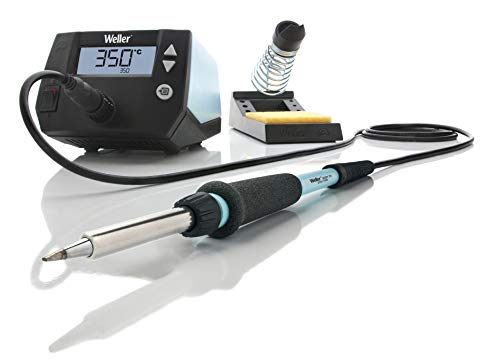
Weller’s WE1010NA is a 70 watt, one-channel digital station built around the WEP 70 soldering iron and the PH 70 safety rest. Weller lists a temperature range of 200 to 450 degrees Celsius and a digital display with push-button setting. The station is ESD safe per Weller, which matters when working on boards with sensitive components.
The ET series tips are the Weller counterpart to Hakko’s T18 line, with a broad range of shapes sold through tool and electronics distributors. The iron is light in the hand, the stand is a separate heavy rest rather than a side pod, and the menu includes a standby temperature and automatic setback to save tip life when the iron sits idle.
Specs (per Weller):
- Type: Digital bench soldering station, one channel
- Power: 70 watts
- Temperature range: 200 to 450 degrees Celsius (392 to 850 degrees Fahrenheit)
- Iron: WEP 70 with ET series tips
- Stand: PH 70 safety rest
- Extras: ESD safe design, standby and setback functions, password protection
Choose the WE1010NA if your bench already uses Weller tips, or you prefer the separate heavy rest and the setback feature for longer tip life.
3. YIHUA 8786D I Two-in-One Hot Air Rework Station

The 8786D I combines a soldering iron and a hot air gun in one bench unit, which is the setup needed for surface-mount work: the iron handles through-hole joints and touch-ups, while the hot air gun removes and refits chips and connectors. YIHUA rates the hot air section at 700 watts, with an air temperature range of 100 to 480 degrees Celsius, and the iron section covers 200 to 480 degrees Celsius.
The Amazon listing for this station bundles 10 soldering iron tips and 4 hot air nozzles, so the common nozzle sizes for small and medium packages are covered from the start. YIHUA lists a sleep function for the iron, a cool and hot air conversion for the gun, and digital temperature correction. The unit is larger than a plain station, so measure your bench space before choosing it.
Specs (per YIHUA):
- Type: Two-in-one hot air rework and soldering station
- Hot air power: 700 watts
- Hot air temperature range: 100 to 480 degrees Celsius
- Iron temperature range: 200 to 480 degrees Celsius
- Included: 10 soldering iron tips and 4 hot air nozzles per the listing
- Extras: Sleep function, digital temperature correction, Fahrenheit and Celsius display
Choose the 8786D I if your projects include surface-mount parts and you want one unit that solders, removes and refits them.
4. YIHUA 926 III Soldering Station Kit
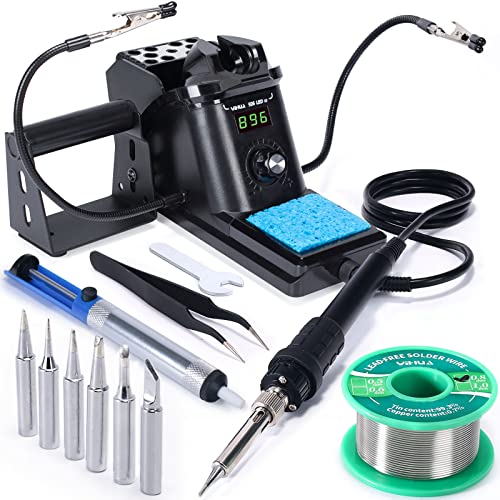
The 926 III is a 60 watt digital station sold as a complete kit rather than a bare station. YIHUA lists a temperature range of 194 to 896 degrees Fahrenheit (90 to 480 degrees Celsius) with PID temperature control and stability of plus or minus 2 degrees Celsius. The display switches between Fahrenheit and Celsius, and YIHUA lists auto sleep and temperature calibration support.
The kit contents are the draw: 6 extra iron tips in the 900M series, two helping hands with alligator clips for holding boards, a roll of lead-free solder wire, a solder sucker for removing solder, ESD-safe tweezers and a cleaning sponge. A beginner can start soldering with what is in the box, and the 900M tip family is widely stocked when replacements are needed.
Specs (per YIHUA):
- Type: Digital soldering station kit
- Power: 60 watts
- Temperature range: 194 to 896 degrees Fahrenheit (90 to 480 degrees Celsius)
- Temperature stability: Plus or minus 2 degrees Celsius, PID control
- Tips: 900M series, 6 extra tips included
- Kit extras: Two helping hands, lead-free solder wire, solder sucker, ESD-safe tweezers, sponge
Choose the 926 III kit if you are setting up a first bench and want the station, tips and basic tools in one purchase.
5. PINE64 Pinecil Smart Mini Portable Soldering Iron

The Pinecil takes the opposite approach to a bench station: the whole iron is the size of a marker pen, with the controller, display and buttons built into the handle. PINE64 lists two power inputs, a USB-C port that accepts USB Power Delivery and a DC barrel jack, so the iron runs from a suitable laptop supply, power bank or DC source. PINE64 rates the temperature range at 100 to 400 degrees Celsius.
The Pinecil runs open-source firmware with a small OLED screen, motion-sensing sleep that drops the temperature when the iron is set down, and a tip system shared with a popular family of portable irons, so replacement tips in several shapes are easy to source. There is no base station or stand in the box, so pair it with a simple silicone mat and a basic stand, and remember it still gets just as hot as a bench iron.
Specs (per PINE64):
- Type: Portable smart soldering iron
- Power input: USB-C Power Delivery or DC barrel jack
- Temperature range: 100 to 400 degrees Celsius
- Display: OLED screen with digital temperature setting
- Extras: Motion-sensing sleep, open-source firmware, interchangeable tips
- Form factor: Pen-style iron, no base station
Choose the Pinecil if your soldering happens wherever the broken device is, or your desk has no room for a permanent station.
How the five compare
The Hakko FX888D and Weller WE1010NA are the closest pair: both are 70 watt digital bench stations from established tool brands, separated mainly by their tip families and stand designs. The YIHUA 8786D I is the only pick here with hot air, which makes it the rework choice, at the cost of the largest footprint. The YIHUA 926 III trades some power and stability margin for a kit that includes the hand tools a first bench needs. The Pinecil gives up the base station entirely for portability, and it is the only pick that can run from a power bank. If you already own tips in one maker’s family, staying in that family is a sensible tiebreaker.
FAQ
What temperature should a soldering iron be set to for electronics?
Follow the solder maker’s guidance for the wire you use. Common leaded solder melts well below the middle of the ranges listed above, and lead-free solder needs a higher setting. Start at the lower end of the maker’s suggested range for your solder and raise it only if joints stay dull or the tip sticks to the pad.
What is the difference between a soldering station and a soldering iron kit?
A station pairs an iron with a separate control unit that regulates tip temperature, usually with a display and a holder. A kit may be a station or a standalone iron bundled with tips, solder, a stand and hand tools. The YIHUA 926 III above is both: a station sold as a kit.
Can a USB soldering iron handle real repair work?
Yes, within its maker’s ratings. The Pinecil reaches the temperatures board work needs and recovers heat well for small and medium joints. Very large joints, such as thick battery tabs or heavy ground planes, are easier on a full bench station, and a USB iron also needs a power supply that meets PINE64’s stated input requirements.
How long does a soldering tip stay hot after switching off?
Treat the tip as a burn hazard until it has cooled fully, which can take several minutes depending on the tip size and the set temperature. Park the iron in its stand, keep hands and cords clear, unplug it when the session ends, and never judge the temperature by hovering a hand near it.
Final verdict
For a permanent bench, pick between the Hakko FX888D-23BY and the Weller WE1010NA by tip family; both are 70 watt digital stations with maker-backed support and deep accessory ranges. Add hot air with the YIHUA 8786D I if surface-mount rework is on your project list. Start a new bench with the YIHUA 926 III kit, which includes the tips and tools a beginner needs in one box. Keep the Pinecil in the tool bag for repairs away from the bench. Whichever you choose, work with ventilation, park the iron in its stand every time, and wash your hands after handling solder.
Product and ASIN Reference
| Product | ASIN |
|---|---|
| Hakko FX888D-23BY Digital Soldering Station | B00ANZRT4M |
| Weller WE1010NA Digital Soldering Station | B077JDGY1J |
| YIHUA 8786D I Two-in-One Hot Air Rework and Soldering Station | B07SCPZJYS |
| YIHUA 926 III 60W Soldering Station Kit | B082F1WKP9 |
| PINE64 Pinecil Smart Mini Portable Soldering Iron | B096X6SG13 |
More from Amazon
Programs that pair well with the guide above. Offers and eligibility are set by Amazon and may change.
Free shipping on eligible items, Prime Video and more. Eligible new members can start with a free trial.
Start a Prime free trialAudiobooks and podcasts to listen to on the go. Eligible new members can start with a free trial.
Try Audible freeAd-free music streaming. Eligible new subscribers can start with a free trial.
Try Music Unlimited freeA free business account with business pricing and bulk-buying tools for work, shop or home office.
Create a business accountAs an Amazon Associate we earn from qualifying purchases.




Write Your Review
No reviews yet. Be the first to share your experience!